

Integration of Your Security Tools Is Crucial for Great Defense
The biggest challenge in cybersecurity defense isn’t the technology, or the ever-changing threat landscape, or lack of budget – it’s the proliferation of tools that lead to team burnout and missed alerts.
In this article we’ll look at the challenges of non-integrated tools, the basics of Application Programming Interfaces (APIs), Model Context Protocol (MCP) and Security Orchestration Automation and Response (SOAR) to integrate different solutions. We’ll cover why building your own security tool integrations can be challenging and offer alternatives for our own Hornetsecurity tools.
Table of Contents
- Security Tools Integration Building Blocks
- How Security Tool Integration Impacts SOC Alert Handling
- Integration as easy as one, two three
- Enhance Email Security with Integrated Protection
- Conclusion
- FAQ
Security Tools Integration Building Blocks
There are several ways of tackling the problem of ending up with scores of security tools that aren’t integrated. The first one is to steer around the problem altogether, by investing in an eXtended Detection and Response (XDR) suite that has modules for email / collaboration hygiene, endpoints, cloud apps, identity etc. that are already pre-integrated.
For many small and medium organizations this is often the best approach, but this might leave areas specific to the business unprotected which still need additional tools. The worry is also, are we getting the best tools or just a suite of average quality tools cobbled together?
Exploring alternative integration options
The second option is to make sure that the tools you purchase have in-built connection options, so integration is straightforward. And the third way is to ensure that you have budget an expertise set aside to build and maintain custom integrations where required.
Traditional integration building blocks include APIs where a tool exposes the information you can query it for, as well as what data you can change through it. These have been around for decades but have taken on a more important role in the age of cloud services. Building a security tool integration based on an API takes programming skills and will need to be maintained over time as options change.

Cybersecurity Report 2026
The AI-Driven Acceleration of Global Threats
The rise of innovative integration solutions
The new kid on the block is MCP. Essentially, it allows publishing similar options as an API provides but through natural language queries. It relies on LLMs to capture the intent of the queries. This enables people to interact with it, and importantly, it allows Agentic AI to interface with it.
Agents, MCP, and the Agent to Agent (A2A) protocols are still early in their evolution. They are seen as a way to integrate disparate services more easily. However, it’s early days, so be aware of potential unknown security risks in MCP deployments.
An older technology that’s having a bit of a renaissance is SOAR, offering a third party “security tool integration engine” where you can connect various services, often using little or no code. These tools hide the complexity of the underlying APIs and make it more approachable for non-developers.
Planning for effective integration
No matter the approach(es) you pick, it pays to have a plan that answers some basic questions:
- What is the expected user experience of the SOC analyst working with alerts?
- What information do they need to be able to determine if the incident is a True Positive (TP, meaning malicious activity happened) or False Positive (FP, it looked like malicious activity, but it was a false alarm)?
- Which systems need to be integrated?
- Do they offer ready-made plug-ins, APIs or MCP endpoints?
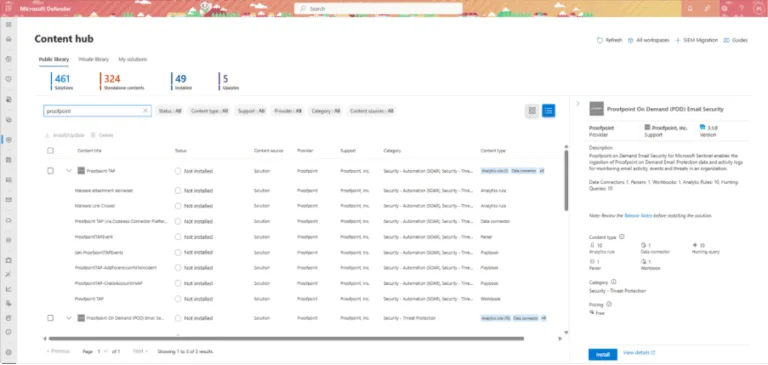
In many businesses the central integration location for all different cybersecurity tools, and logging from security systems on premises and in the cloud; is a Security Information and Events Management (SIEM) system. These often come with hundreds of different security tool integrations built-in for rapid adoption of different data sources and tools. Here’s an example in Microsoft Sentinel, a cloud-based SIEM, and two of the available Proofpoint integrations.
How Security Tool Integration Impacts SOC Alert Handling
Jane is a SOC analyst at a medium-sized financial company, and she starts her day with a coffee and starts triaging the alert at the top of the queue – end user clicked link in potential phishing email.
In a fragmented Security Operations Center (SOC), she’ll spend minutes looking at the email in the hygiene solution. Then, she will use another tool to analyze the link and the target website. These often have multiple levels of redirects to confuse automated scanning while allowing actual humans through.
Once she reaches the target page, she uses a third tool to understand the purpose of the page, whether it’s malicious or not (it could just be a convoluted marketing campaign promotion), and then a fourth tool to look at the payload.
She’ll also need to consult various Threat Intelligence feeds to identify if the email or link is malicious. If any data exfiltrated from the email inbox or documents, she might check a DLP tool. This will help her determine if any sensitive data was compromised.
The role of EDR in cybersecurity analysis
Further she might need to investigate the user’s endpoint device(s) in Endpoint Detection and Response (EDR), yet another tool, to see if it’s compromised or not, and if she determines that this was indeed a true positive, she’ll then need to disable the user’s account, isolate the endpoint, and start the remediation process of resetting user credentials, and clean the device. After half an hour or more, she can move on to the next alert.
In a fully integrated suite of tools, Jane’s experience is very different. She’ll see a prioritized and already triaged list of alerts with the most urgent / most likely to be a true positive at the top. When she opens it, all the details of the user account, the email itself, links and the target website already analyzed, plus in-depth information about the endpoint.
Ideally, Jane can perform the entire investigation in one tool. She never has to leave that UI, which speeds up resolution and minimizes context switching.
The reasons many businesses end up in the first scenario are varied but mainly boils down to “chasing the new shiny”, purchasing tools to solve a particular problem, and the lack of verified data as to what actually works to guide deployment considerations.
Integration as easy as one, two three
Another popular SIEM is Splunk, and Hornetsecurity provides an add-on in Splunkbase, a catalog of over 1000 apps that can be added to Splunk. This add-on brings email logs from Hornetsecurity 365 Total Protection into Splunk, with automated data ingestion, real-time monitoring, lets you build dashboards and generate alerts based on Hornetsecurity data.
Installation is straightforward, grab the add-on, install it into Splunk Enterprise, create an API key in the Hornetsecurity Control Panel and enter that into the configuration of the add-in.
If you’ve made the excellent choice to protect your organization’s email inboxes with 365 Total Protection, and you’re using Splunk as your SIEM, make sure to provide a more integrated and holistic solution for your SOC analysts using the add-in.
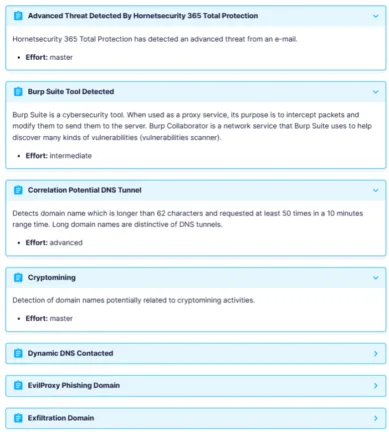
If, on the other hand,& you’ve deployed Sekoia Defend (XDR) to protect your organization, use our add-in to create an “intake” to bring in logs and events from Hornetsecurity 365 Total Protection. You can then rely on the built-in rules to create alerts from log data, as well as create custom detection rules, plus hunt over the log data.
Enhance Email Security with Integrated Protection
Keep your email safe from spam and malicious threats with our robust email security solution. Experience real-time protection and advanced threat detection to keep your inbox clean and secure.
Plus, with our integration, you can seamlessly addHornetsecurity 365 Total Protectionemail logs into Splunk for automated data ingestion. Enjoy real-time monitoring and easily build custom dashboards and alerts to stay ahead of potential threats.

Don’t leave your email security by chance. Get started today with Hornetsecurity 365 Total Protection!
Conclusion
The best way to create an effective cybersecurity culture in an organization is to marry people, process, and technology. The best approach isn’t to buy point solutions for every cybersecurity risk. Instead, ensure that your tools are integrated and provide the information analysts need without extra digging. If you’re using Splunk or Sekoia, integrating with Hornetsecurity 365 Total Protection is straightforward.
Happy hunting!
FAQ
Why is integrating security tools important?
Integrating security tools helps reduce team burnout and minimizes missed alerts, creating a streamlined workflow for security analysts. By providing holistic views and insights, integrations significantly enhance incident response times and overall organizational security effectiveness.
How does Hornetsecurity facilitate tool integration?
Hornetsecurity offers seamless integration with popular SIEM platforms like Splunk and Sekoia. Our add-ons enable automated data ingestion, real-time monitoring, and simplified alert generation, allowing security teams to streamline their operations and reduce alert fatigue.
How can I integrate Hornetsecurity with my existing security systems?
To integrate Hornetsecurity with systems like Splunk or Sekoia, you simply need to install the relevant add-ons, then create an API key in the Hornetsecurity Control Panel, and, in the end, configure the integration. The entire process ensures efficient data flow and comprehensive insights for your security operations.